I've been reading about the gimbals for the last couple of months, and there are a lot of models you can buy, it's a mess! Firstable, I'll go for a 2 axis one to reduce complexity. Secondable, an affordable one, I've seen some very very expensives!
Someone tells me to take a look to goodluckbuy.com, there are a lot there, coming from China, and they normally work well.
So, I get this Aluminum Brushless Gimbal Camera Mount w/ Motor & Controller for Gopro2 FPV Aerial Photography

After a couple of weeks I have it home, but to my sorprise I have received two pieces of the AX1, and I have NOT received the piece BX1 (following the instructions manual) :s.
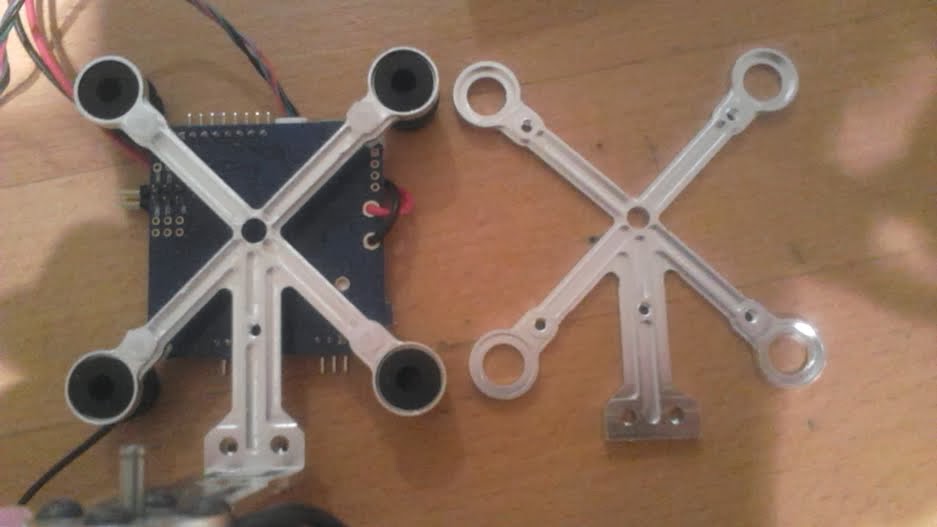

Noooooooo.... So I complained and they were very quick to answer and agree to send me the correct piece. Another two or three weeks until having it home.
However, in the meanwhile, I start trying to make it work. The manual says no much about how to connect the wires of the motors to the board. There are three black wires per motor, but no labels on them, so I have no clue which one is positive, negative... And I'm afraid to connect it to the wrong position and burn the board :s, if that can happend :p

After some tests, it seems to be stabilizing the camera. But as it is not doing it perfectly fine, I go for an upgrade.

I donwloaded the driver and the software (SimpleBGC_GUI_2_0b3) to check the version and upgrade it if that's the case. Mmm a new version available! let's try..., it says "installing"... great... why is this taking so long?... still "installing"?... I think something goes wrong, let's just disconnect the usb from the computer and start over. Mmmm why this thing is not making any sound at all? why the software is not recognizing the gimbal! why there's this red permanent light on all the time!! :(
Disconecting the usb while updating/upgrading is not a good idea at all. After reading in some forums, I discovered I've damaged the bootloader! Here you can find instructions about how to fix it. However, I don't understand more than the basics of electronics and have no clue about how to start with this, and I also need to buy some components but don't know for sure which ones...
As I really want to record nic shots soon, I'm thinking of ordering a well known gimbal, and while it arrives trying to fix this one.


